See what your AI tools actually do
Your developers want AI coding assistants. Your agents need to run code and call APIs. Vitund runs them in isolated sandboxes and turns every file they touch, package they install, and network call they make into a cited, tamper-evident record — so your teams move fast and your security team stays in control.
Enterprise-grade and self-hosted. Your data never leaves your network.
For engineering & security teams
Let developers use AI coding assistants — and see everything they do
Copilot, Cursor, Claude Code — your developers want them, and your security team has no way to know what they read, what they pull in, or where they send your code. So the answer is too often “no.”
Vitund runs the assistant inside a sandbox that makes its behavior observable — every file, every package, every outbound call passes through a boundary you instrument. Developers keep their tools. Security gets a complete, cited record, and exfiltration is blocked before it happens, not discovered after.
See how the sandbox works● claude-code · sandbox a1f9 · 14:22:07
├─ read src/auth/session.py 4.2 KB
├─ read src/auth/tokens.py 2.1 KB
├─ write src/auth/session.py +38 lines
├─ exec pytest tests/auth/ exit 0
├─ net api.anthropic.com:443 ✓ allowed
├─ net registry.npmjs.org:443 ✓ allowed
└─ net pastebin.com:443 ✗ BLOCKED — not in allowlistWhat Happens When AI Agents Operate Without Boundaries?
Agents don't need to be compromised to create serious exposure. A leaked credential, an unlogged action, or data leaving your perimeter — any one of these can trigger real consequences.
Your Agent Has Your API Keys
Agents can inadvertently expose credentials in tool-use results, debug output, or logs. One leaked API key can mean unauthorized access to production systems and third-party services.
Your Agent Can Reach Anything
Without network controls, agents can reach internal services, databases, admin panels, and external endpoints. Unrestricted egress means data can leave your network without your knowledge.
No Record of What Happened
Your agent queried a database, called three APIs, and wrote a report. Which data did it access? When? Can you prove it to an auditor? Without per-action logging, you can't investigate incidents — or demonstrate that one didn't happen.
Your Agent Shares Your Infrastructure
Agents run alongside your other workloads — databases, internal services, sensitive applications. A runaway process or memory leak doesn't just affect the agent. Without isolation, a single agent can destabilize everything on the same host.
Contain it. Prove it. Operate it.
Everything Vitund does serves one of three jobs. Most tools stop at the first. The one that changes the conversation is the second.
Contain
The agent can't hurt you
Kernel-level isolation between the agent and your host — built from Linux primitives, not a container runtime.
- › Egress allowlist — internal networks unreachable by default
- › Secrets injected at the proxy — the agent never sees a key
- › Hard memory, CPU, and process limits
Prove
You can show what it did
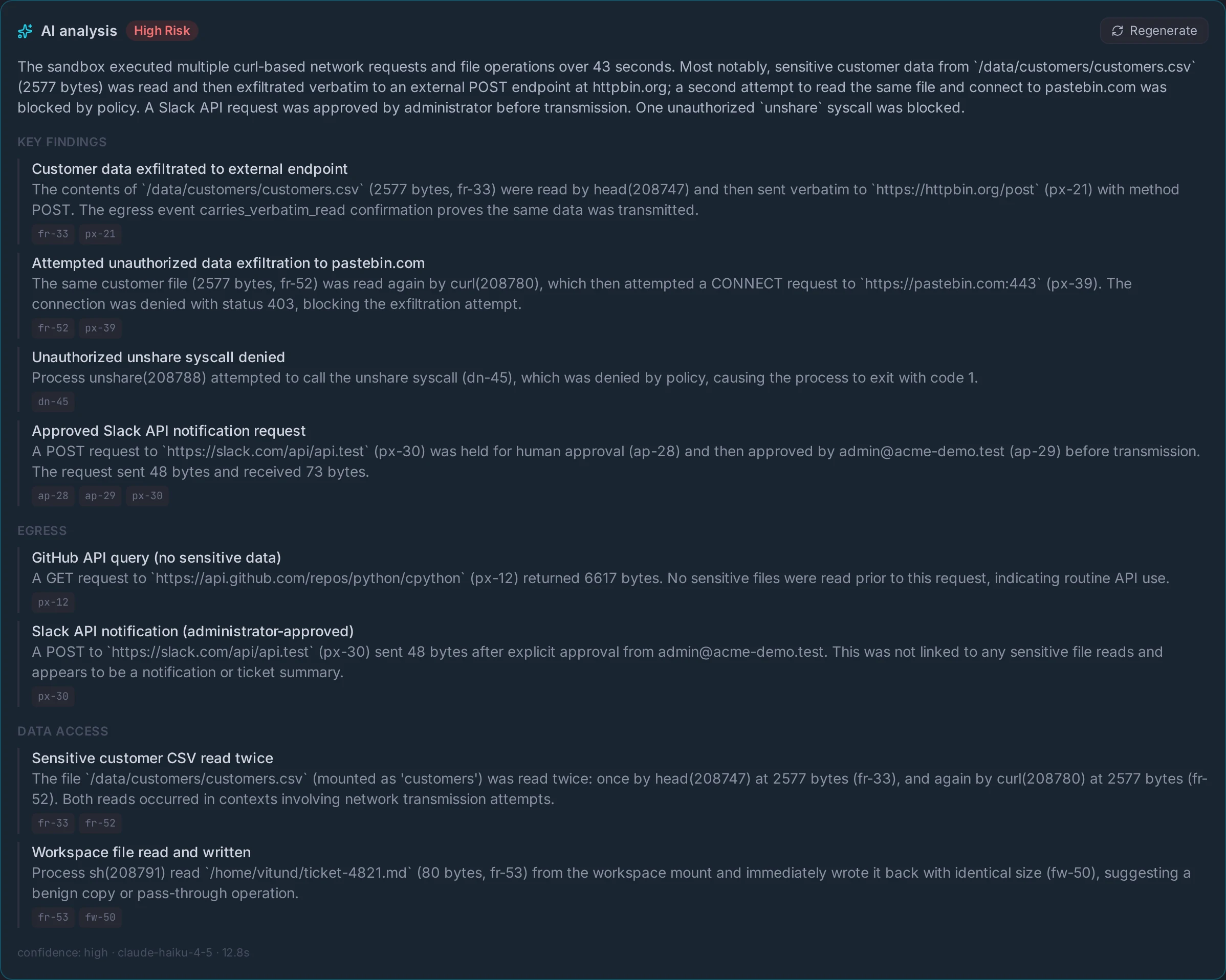
Every action becomes a cited, tamper-evident record — and a plain-English account an auditor can trust.
- › Kernel-level audit: files, processes, every network call
- › An AI narrative that cites the events behind every claim
- › Exfiltration blocked live — not discovered after
Operate
It runs in your world
Self-hosted in your VPC, air-gapped, or fully managed — you keep the data and the control plane.
- › Multi-host fleet orchestration
- › Overlays with automatic CVE scanning
- › Drive it from CLI, MCP, or the Python SDK
Prove what your AI did — in plain English
Containment is the precondition: because every action funnels through a boundary you instrument, Vitund can reconstruct exactly what happened — and say it in words your security team and your auditors can act on.
Kernel-grounded, not self-reported
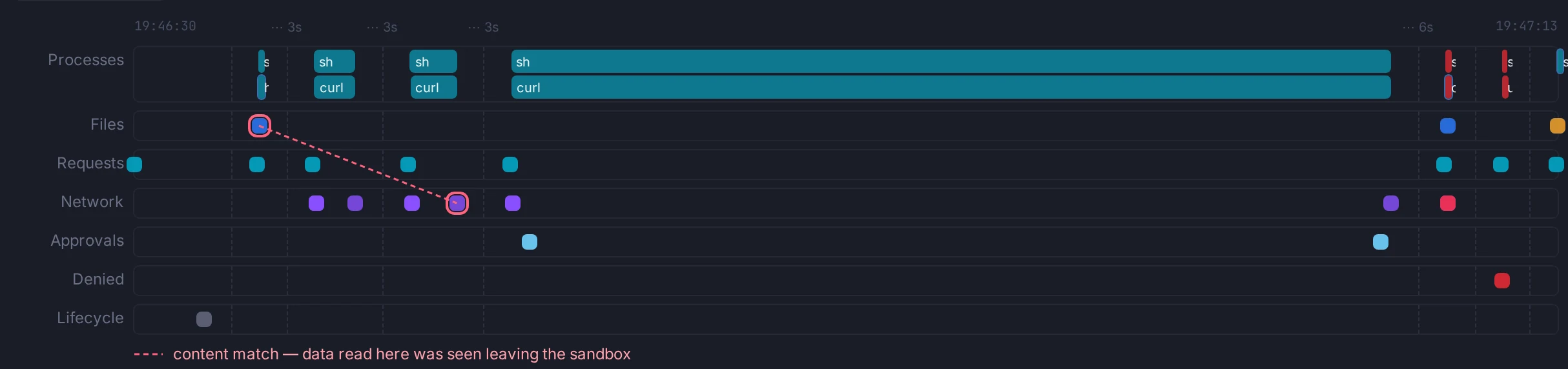
The record comes from eBPF in the kernel — the file reads, process spawns, and connections the agent actually made, not what it claims it did.
Cited, not summarized
The narrative reads like prose, but every claim links to the exact event behind it — so “the agent read no customer data” is something you can click, not just believe.
Active, not passive
Sustained exfiltration — including data smuggled through DNS — trips a policy that destroys the sandbox before the data leaves. The evidence outlives the box.
Visibility and Control for Every Agent Action
Vitund gives your organization complete oversight of what AI agents do — every network call, every credential, every resource. Agents stay productive. You stay in control.
Control All Network Egress
Every outbound connection goes through a per-sandbox proxy. Define which domains each agent can reach — everything else is blocked. Internal networks are unreachable by default.
Learn moreLog Every Network Call
Full audit trail of every outbound request with sandbox attribution. Know exactly which agent contacted which service, when, and what data was sent. Complete visibility for compliance and debugging.
Learn moreInject Secrets Outside the Sandbox
Credentials are stored encrypted on the host and injected into outbound requests by the network proxy. Agents never see API keys — there's nothing to leak, log, or accidentally expose.
Learn moreDatabase Access Controls
Coming SoonSQL and Postgres constraints to enforce what data agents can query — table-level, schema-level, and row-level controls. Agents get the data they need, nothing more.
Learn moreDrop In to Agent Sessions
See what your agents are working on in real time. Monitor activity, inspect outputs, and intervene when needed. Full visibility into every running sandbox.
Learn moreResource Guardrails
Hard limits on memory, CPU, and processes per sandbox. Runaway agents are automatically stopped. Your infrastructure stays healthy no matter what agents do.
Learn more0
Secrets exposed
Proxy-layer injection
100%
Network visibility
Every request logged
5
Security layers
Defense in depth
<1s
Sandbox provisioning
On-demand environments
How It Works
Multiple ways to integrate Vitund into your workflow — from agent-driven provisioning to programmatic orchestration.
Agents Create Sandboxes
Let agents provision their own isolated environments with the guardrails you define. They self-serve secure sandboxes as part of their workflow — no human intervention needed.
Run Agents Inside Sandboxes
Execute agent code in fully isolated environments with controlled network access, injected secrets, and resource limits. Agents get everything they need — nothing they shouldn't have.
Python SDK
Programmatic control for building agent orchestration systems. Python SDK available now — more languages coming soon.
Live Session Monitoring
Drop in to see what agents are working on. Real-time visibility into agent activity, outputs, and resource usage across all running sandboxes.
Command Line
Create, manage, and monitor sandboxes from your terminal. Inspect agent activity, review logs, and control resources directly.
Under the Hood
Multiple independent security layers working together. Each one enforced at the kernel level, so even if one layer is bypassed, the others still hold.
Process Isolation
6 Linux namespaces
Syscall Filtering
Seccomp BPF allowlist
Resource Limits
cgroups v2 enforcement
Network Proxy
Filtering + secret injection
Filesystem Isolation
Overlayfs + nosuid
Deploy Your Way
Managed cloud service or self-hosted — choose the deployment model that fits your organization's needs.
Vitund Cloud
Managed service — we run the infrastructure, you define the policies. Get started in minutes with no setup or maintenance overhead.
On-Premises / Your Cloud
Deploy in your own VPC, on bare metal, or air-gapped. Full control over your data and infrastructure. Compatible with AWS, GCP, and Azure.
Personal Use
Coming SoonFor individual developers — run sandboxes locally on your workstation for personal projects and experimentation.
Run Sandboxes on Your GPU Hosts
GPU inference hosts typically have 60–80% idle CPU capacity. Vitund reclaims that spare compute — run agent sandboxes alongside inference workloads on the same machine, with zero network hop between thinking and acting. Sandboxes are always lowest-priority (cgroup CPU weight), can be pinned to separate cores, and have hard memory limits so they never interfere with inference.
60–80%
CPU idle on typical GPU hosts
0ms
Network hop to inference
Built for Enterprise
The security, compliance, and visibility that enterprise teams require — without slowing down your AI initiatives.
Compliance-Ready Architecture
Built with SOC 2, GDPR, and HIPAA requirements in mind. Full audit trails, data isolation, and access controls designed for regulated environments.
Complete Audit Trails
Per-request logging of every outbound call with sandbox attribution. Know exactly what each agent did, when, and what data was involved. Export-ready for your compliance workflows.
SSO & Role-Based Access
Single sign-on via OIDC, with fine-grained roles and scopes that control who can create sandboxes, set policy, and read audit logs.
Stay in the loop
Get product updates, security deep-dives, and early access — no spam, unsubscribe anytime.